Sentinel v11 Windows gaming Unique Optimizer
A downloadable Optimizer for Windows
Eliminate stutters and freezes from your Steam/Epic games — automatically
Sentinel is a predictive optimizer that runs alongside your Steam games. It detects your game automatically, learns how it uses your hardware, and prevents micro-stutters before they happen.
No configuration needed. No per-game profiles to download. Just run Sentinel, launch your game, and play. It gets better every session.
How it works
Other optimizers react — they detect a problem and try to fix it after it already happened. Sentinel predicts — it learns when and where your game needs data, and prepares your system before the game asks for it.
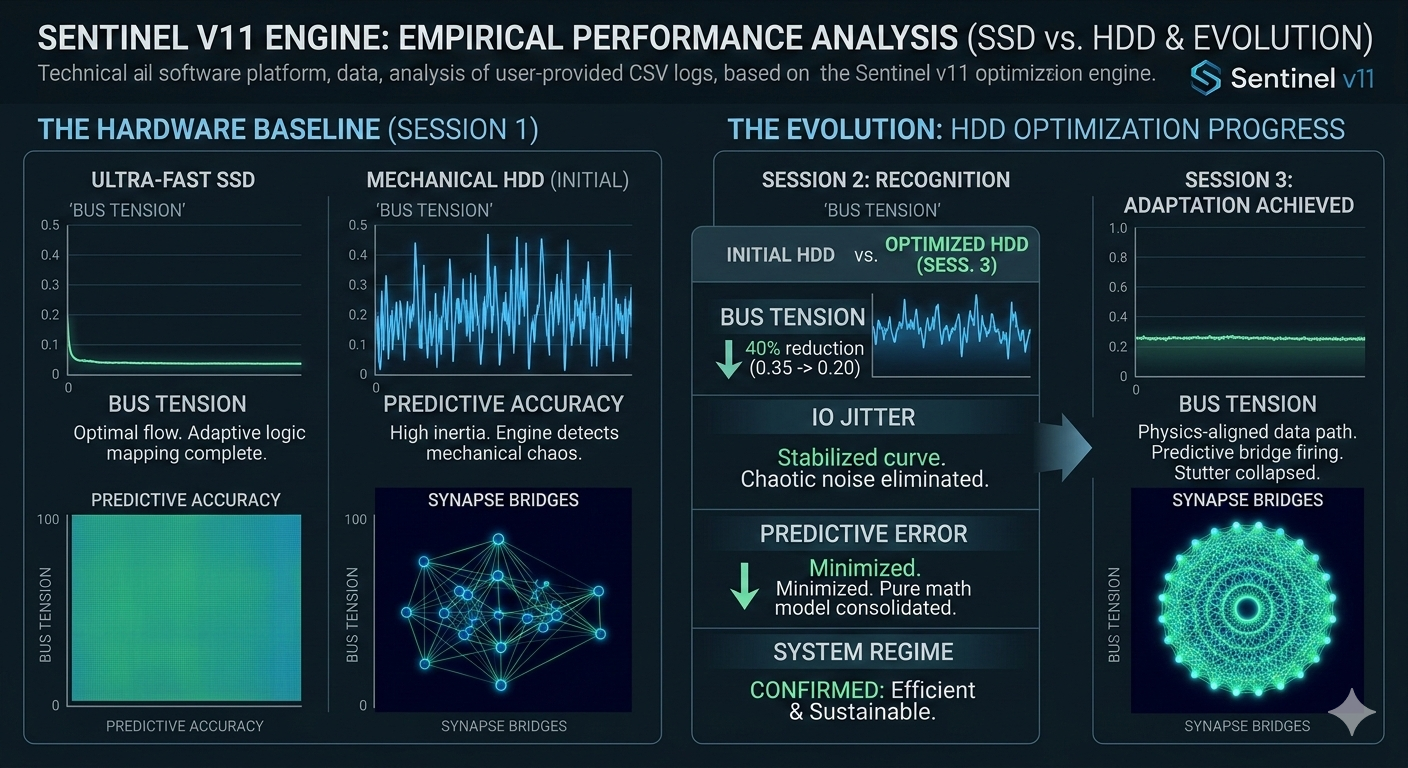
Session 1: Sentinel monitors and learns. Your game runs with basic optimizations while the engine maps every pattern in the background.
Session 2+: Sentinel acts on what it learned. It starts preparing your system ahead of time. Stutters drop. Loading times shrink.
Session 5+: The engine knows your game by heart. It predicts zone transitions, asset loading, and streaming patterns seconds before they happen. Your game runs at its smoothest.
What you get
Automatic game detection Launch any Steam game — Sentinel detects it instantly and starts working. No setup, no profiles to download, no configuration menus. It just works.
Adaptive learning engine Sentinel remembers how each game uses your hardware. The first session it observes. From the second session onward, it anticipates what your game needs and prepares your system in advance. The more you play, the smoother it gets.
Predictive memory optimization Instead of reacting to freezes after they happen, Sentinel predicts when your game is about to load heavy data and prepares your RAM ahead of time. The result: fewer stutters, shorter loading screens, smoother gameplay.
Intelligent CPU management Sentinel identifies what each game thread is doing and gives priority to the ones that matter most for your framerate. No manual tweaking needed — it adapts in real time.
Thermal awareness Monitors your system temperature and adjusts its intensity to avoid thermal throttling during long gaming sessions. Your performance stays consistent from minute one to hour three.
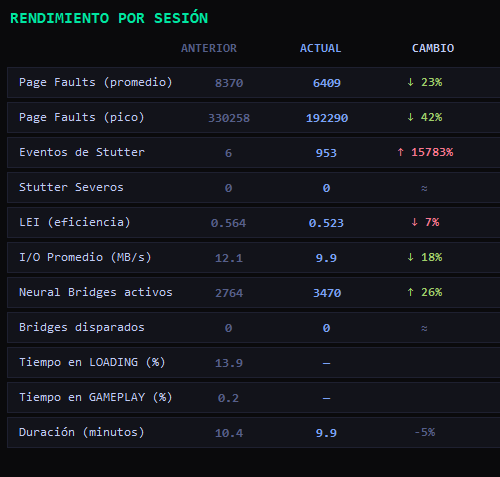
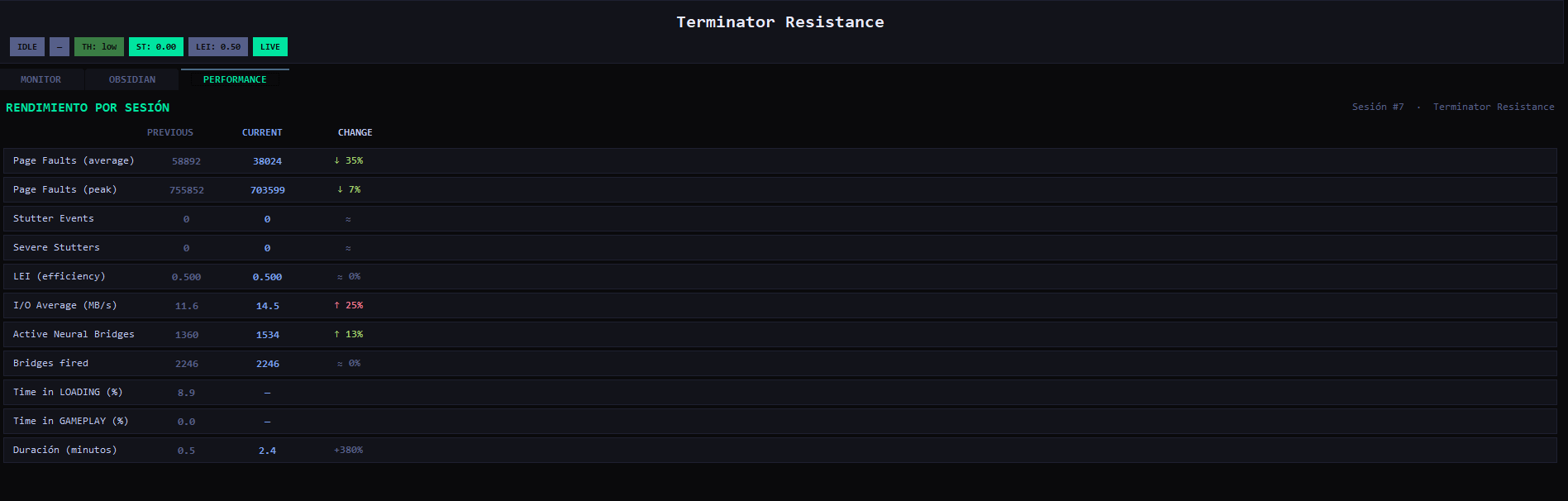
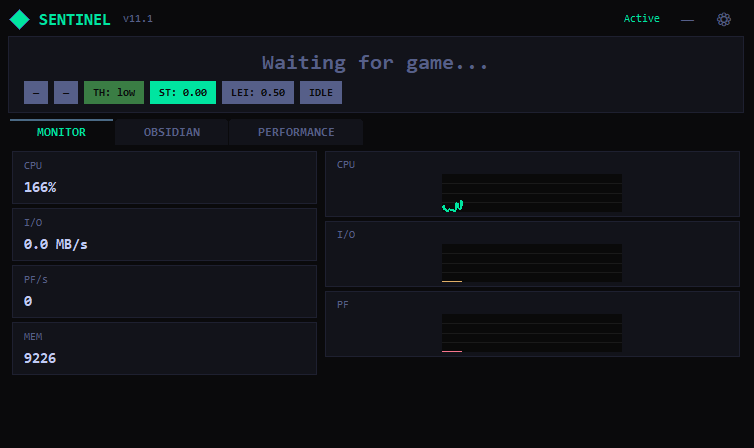
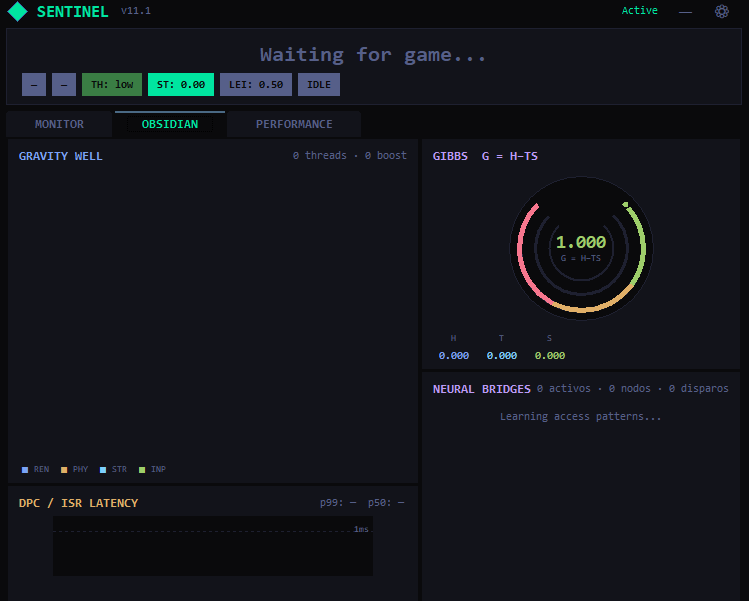
Real-time dashboard Three tabs to see exactly what's happening: Monitor shows live system stats. Obsidian shows the optimization engine at work with visual indicators. Performance shows session-over-session comparison — you see your improvement in real numbers.
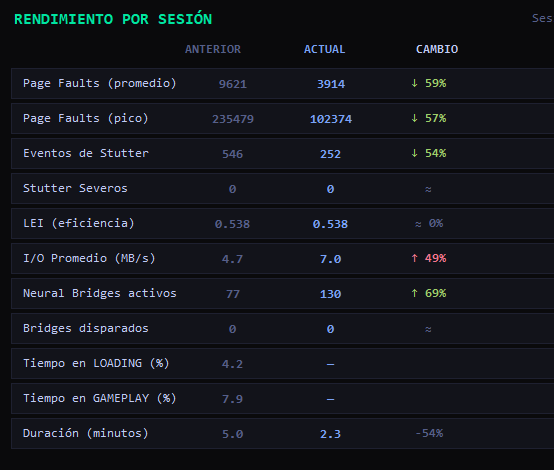
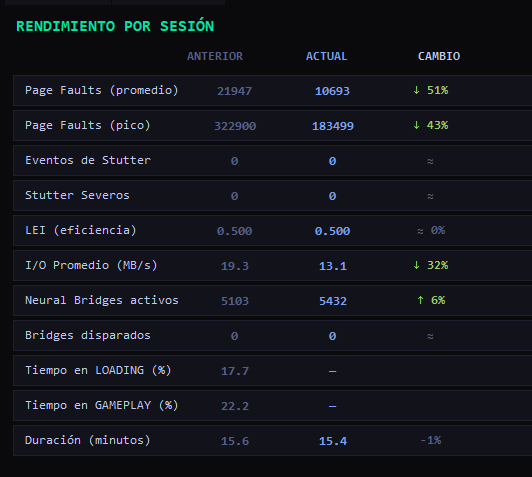
Session comparison The Performance tab shows your previous session vs. current session side by side. Green arrows mean improvement, red means regression. You can verify with your own eyes that Sentinel is making a difference — no guesswork, no placebo.
Measured results (real sessions, real hardware)
Tested on a budget PC (Ryzen 5, RX 580, 16GB RAM, HDD):
| Game | What improved | How much |
|---|---|---|
| Darksiders 3 | Memory pressure | -30% average, -42% peaks |
| Dark Souls 3 | Memory pressure | -59% average |
| Dark Souls 3 | Stutter events | -54% fewer |
| Days Gone | Memory pressure peaks | -43% |
| Terminator Resistance | Memory pressure | -51% average |
Results improve with every session as Sentinel learns more about each game.
Best for
Open world games — Skyrim, Elden Ring, Witcher 3, GTA V, Days Gone. Maximum impact because streaming is constant and zones are revisited.
Souls-like — Dark Souls, Hollow Knight. The more you repeat an area, the better Sentinel optimizes it. Boss rooms feel smoother by attempt 3.
Survival / Crafting — Minecraft, Valheim, Subnautica. Your base and frequent routes get optimized automatically.
RPG / JRPG — Final Fantasy, Persona, God of War. Level transitions and loading screens benefit the most.
HDD users — If you're still on a hard drive, Sentinel's impact is 3-5x larger than on SSD. Each prevented freeze saves 7-15ms of waiting for the disk.
Works great with FSR and Frame Generation
If you're already using AMD FSR, NVIDIA DLSS, or Frame Generation to boost your FPS, Sentinel is the missing piece that makes them work the way they should.
Here's the problem: FSR and Frame Generation can push your FPS from 30 to 60+, but they can't fix stutters caused by your disk or memory. When a game freezes for 15ms loading a texture, the interpolated frames get corrupted — you see ghosting, visual glitches, or micro-freezes even at "60 FPS."
Sentinel prevents those freezes from happening in the first place. The result: FSR and Frame Generation receive clean, consistent frames to work with, and the output is smooth without artifacts.
What the combination looks like on budget hardware:
| Setup | FPS | Experience |
|---|---|---|
| Native 1080p | ~22 | Unplayable |
| FSR Quality alone | ~40 | Playable but stutters every 10s |
| FSR + Frame Generation | ~80 | Smooth but visual glitches on zone loads |
| FSR + Frame Gen + Sentinel | ~80 | Smooth and clean — no glitches, no freezes |
Sentinel doesn't add FPS — it makes your existing FPS consistent. When combined with FSR and Frame Generation, it turns "technically 60 FPS with freezes" into "actually 60 FPS that feels like 60 FPS."
Results depend on your hardware, game, and storage type. The table above reflects testing on a mid-range system (Ryzen 5, RX 580, 16GB RAM). Older or lower-spec hardware will still benefit but actual numbers will vary. Sentinel optimizes what your system can do — it doesn't replace the need for hardware that meets the game's minimum requirements.
Requirements
- Windows 10 or 11 (64-bit)
- Steam/Epic installed
- Run SentinelGenesis_AVX2launcher or SentinelGenesis as Administrator (needed to optimize memory)
- Works with any hardware — adapts automatically to your specs
Important notes
- Single-player and co-op games — Works best with games that don't use aggressive anti-cheat (EasyAntiCheat, BattlEye, Vanguard). Competitive multiplayer games with anti-cheat may block Sentinel's optimizations.
- Give it time — The first session is learning. Full improvement starts from session 2-3 and keeps getting better.
- Your data stays local — All learning data is stored on your PC. Nothing is sent anywhere.
About
Built by an independent developer. Sentinel uses a proprietary prediction engine that no other game optimizer has — it doesn't just clean RAM or kill background processes. It learns your games and acts before problems happen.
Questions or issues? Leave a comment on this page.
Download
Click download now to get access to the following files:
Development log
- Sentinel v11 Game Optimizer: Raw Engine in Action16 days ago
- Sentinel v11: Architecture and Technical Components18 days ago
- The Path to v12 Obsidian: Redefining Performance18 days ago
- BIG SALE: Sentinel v11 FSR Enhancer + Stutter Fix [80% OFF - Limited Time]37 days ago
- Sentinel Genesis v11.5: Selección de Arquitectura SSE2/AVX246 days ago
- El Despertar de Sentinel (Fase Cosmética y Video Demo)47 days ago
- SENTINEL v11: Por un Gaming sin Barreras (Flash Sale 50% OFF)48 days ago
- New benchmarks, new achievements for Sentinel, The Callisto protocol and Hogwart...51 days ago
Leave a comment
Log in with itch.io to leave a comment.